


Ryanair
3.21.17K Reviews
App Specs
- Version
- 3.238.0
- Updated On
- License
- Free
- Downloads
- 50,000,000+
- Developer
- Ryanair Limited
- Categories
- Travel & Local
- Platform
- Android, iOS
Screenshots

 Analysis by AppCompare
My view of the Ryanair app starts before I book anything: I want to know whether it can take me from comparing a trip to getting through the airport without adding avoidable hassle. It is a free travel app from Ryanair Limited, and its clearest role is helping people who are considering or have booked a Ryanair flight manage that journey from a phone. I would treat it as a practical airline companion, not as a complete travel-planning service that replaces every other tool.
Where it fits in a travel plan
If I am still deciding where to go, I usually begin with a broader travel search: I want to compare routes, dates, and airlines before settling on one. Ryanair is more useful once I am looking specifically at its flights or have already chosen one. That distinction matters. An airline’s own app can make booking and trip management feel direct, but it is not the same as an independent comparison service whose main purpose is to show options across carriers.
That makes the app a reasonable fit for a short break, a visit to family, or a trip where I already know the route I want to investigate. It is less compelling if my first priority is comparing the full cost and convenience of every airline serving a destination. I would use a broader search to make that decision, then turn to the airline app when I am ready to handle a Ryanair booking.
The app has been around since October 25, 2012, and its current version is 3.231.0. Its average rating is 3.5 from around 383,000 ratings, while it has over 50 million installs. Those figures suggest that it is widely used, but I would not treat popularity as proof that every part of a particular trip will go smoothly. Travel apps are judged in stressful moments, and the value of this one depends on how well its booking and airport steps suit your plans.
From choosing a flight to reaching the gate
My useful way to think about the app is as one link in a longer chain: search, decide, book, prepare, check in, and use the boarding pass. It brings several airline-related tasks together, which can reduce the need to hunt through emails and separate screens. Still, I would keep important travel details easy to find outside the app as well, especially when a trip involves other people or several bookings.
Starting with the route and fare
First things first, getting started with the Ryanair app is a breeze. You simply download it from the App Store or Google Play, depending on your device, and voila – you’re ready to dive into the world of budget travel. The app’s design is sleek and intuitive, which is always a plus. No one wants to wrestle with clunky interfaces when they’re dreaming of far-off destinations, right?
Once you open the app, you’re greeted with a straightforward menu that lets you search for flights, check in, and even manage your bookings. I really appreciated the simplicity of it all. It’s like having a personal travel agent right at your fingertips.
Worth Reading Before You Choose

Flipboard Shows What News Apps Must Do Beyond the Feed

Switching to Android Auto Means Rethinking Your Driving Routine

Google Calendar Makes a Crowded Week Easier to Manage

Ludo King Makes the Most of the Minutes Between Plans

Baby Panda World Brings Quick Play to Modern Phones, but Its Game Library Feels Busy

ESPN’s Live Game View Makes Following Close Games Easier
Booking Made Easy
Now, onto the main attraction: booking a flight. The search function is as easy as pie. You enter your departure and arrival cities, choose your dates, and hit search. In seconds, you’re presented with a list of flights. What I found particularly helpful is the app’s ability to filter results based on your preferences, whether it’s cheapest fare, shortest duration, or preferred time of day.
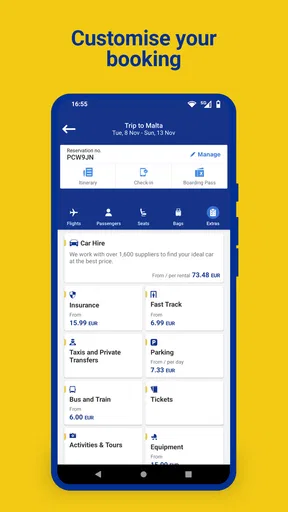
Once you’ve picked your flight, the app smoothly guides you through the booking process. It’s all about convenience here. You can add extras like baggage or priority boarding with just a few taps. The payment process is secure and quick, which is always reassuring when you’re dealing with your hard-earned cash.
Small decisions that affect the trip
When I compare fares, I try not to let the lowest headline price make the decision for me. The booking flow presents a moment to consider extras such as baggage or priority boarding, so I would pause there and think through what I actually need. A fare that looks cheaper at first can be a poor fit if I later need an add-on; equally, paying for an extra I will not use makes the trip more expensive without making it better.
A useful habit is to decide on baggage needs before opening the booking flow. For a short visit with minimal belongings, I may not need the same setup as I would for a longer stay or a trip carrying equipment. Making that choice in advance helps me avoid tapping through add-ons simply because they appear at the point of purchase. I would also review the route, dates, and passenger details carefully before paying, since correcting a rushed decision is a less pleasant use of travel time than checking it once while booking.
For a realistic example, imagine I am arranging a weekend visit and have fixed dates but some flexibility about departure time. I would search the route, compare the available options against my schedule, and weigh the time saved against the fare rather than choosing on price alone. If I book through the app, I can then return to the same place to manage the flight. If I am still deciding between airlines, I would first compare options elsewhere and use Ryanair’s app after deciding that its route and conditions suit me.
Preparing for departure
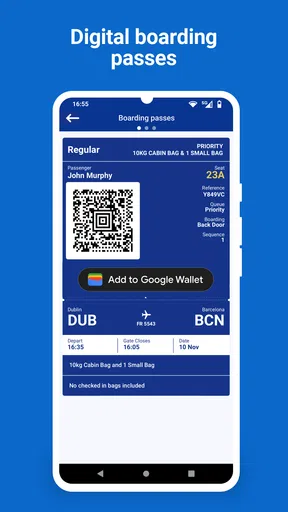
One of the standout features for me was the check-in process. Gone are the days of frantically printing boarding passes at the last minute. With the Ryanair app, you can check in directly from your phone and store your boarding pass digitally. No paper, no fuss. I found this aspect particularly appealing as I’m all about minimizing the pre-flight stress.
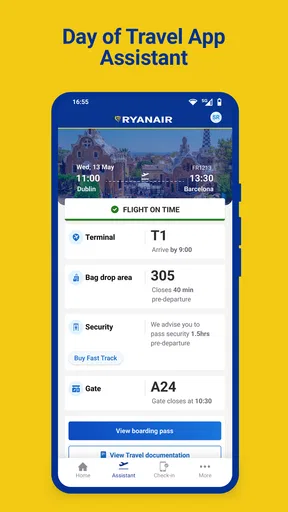
When it comes to boarding, the app keeps you updated with real-time notifications about gate changes and boarding times. It’s like having a personal assistant in your pocket, ensuring you’re always in the loop. Plus, if you’re someone who loves to stay organized, the app lets you manage all your travel documents in one place.
Keeping the handoffs manageable
Checking in on a phone is convenient, but a boarding pass is only useful if I can bring it up when I need it. I would make sure I know where it is in the app before leaving for the airport, rather than trying to learn the layout while joining a queue. Keeping my phone charged and carrying a backup way to identify the booking are sensible habits for any digital boarding pass, especially when a device problem would otherwise turn a simple handoff into a delay.
Notifications can help with changing airport details, but I see them as prompts to check, not as a reason to stop paying attention to airport screens or announcements. A gate update matters only if I notice it and act on it. This is one place where the app and the airport experience have to work together: the app can put information in my hand, while I still need to follow local signs and instructions.
For a group trip, I would also agree in advance who is keeping track of the booking and boarding passes. A shared plan prevents the awkward last-minute question of whose phone has the important screen. The app can keep travel details together for the person managing the booking, but the group still benefits from knowing the flight information and meeting point independently.
Beyond the flight itself
But wait, there’s more! The app isn’t just about flights. It also offers a range of travel extras like car rentals, hotel bookings, and even travel insurance. While I didn’t personally use these features, it’s nice to know they’re available for those who like to keep everything under one roof.
Another cool feature is the app’s price alert system. You can set alerts for specific routes and get notified when prices drop. This is a game-changer for anyone who loves a good deal. I mean, who doesn’t love saving a few bucks on flights?
When keeping everything together is not the goal
Extras and route alerts can make the app useful earlier in the planning process, but I would not assume that an alert makes a fare right for my plans or that an in-app extra is automatically the best fit. A notification is a reason to revisit a route and check the details, not an instruction to book immediately. If I am planning a trip with hotel, ground transport, and flights from several carriers, I would compare those pieces in the tools best suited to each one rather than expecting a single airline app to be my whole itinerary.
The advantage of handling a flight and related tasks in one airline app is convenience. The trade-off is focus: its strongest purpose is the Ryanair part of the journey. A general travel app may be more helpful for comparing providers or keeping a mixed itinerary together, while Ryanair is the more direct choice when I need to deal with a Ryanair flight. I would choose based on the task, not on an idea that one app must do everything.
Where the journey can feel less smooth
No digital workflow removes the need to slow down at key points. Booking involves choices about the trip and its extras; check-in and boarding depend on having the right information available at the right time. If I rush through a screen or overlook a detail, an easy interface cannot make that decision for me. I find it more useful to treat the app as a convenient place to complete tasks, not as an automatic guarantee that I have prepared for every airport step.
There is also a practical limit to relying on a phone. A drained battery, an unavailable connection, or simply being unfamiliar with where a boarding pass is stored can create friction when time matters. I would prepare before travel, keep the device ready, and save the details I need in a way I can find quickly. For someone who strongly prefers printed documents or wants no dependence on a phone at the airport, a digital-first process may not feel as reassuring.
The app is rated for Everyone and is free to download, so its basic appeal is broad. But that does not mean it is ideal for every traveller. If I want a single place to compare multiple airlines, organize a complicated multi-carrier itinerary, or make every travel decision outside an airline’s own booking environment, I would pair it with other tools or choose a broader travel planner. If I already know I am considering Ryanair, the focused workflow makes more sense.
The Final Verdict
All in all, I’d say the Ryanair app is a handy tool for anyone looking to book flights quickly and efficiently. It’s user-friendly, packed with useful features, and makes the whole travel process a lot less stressful. Sure, it’s not perfect – no app is – but it certainly gets the job done without any major hiccups.
Whether you’re a frequent flyer or someone who occasionally jets off on adventures, the Ryanair app is worth checking out. It’s like having a trusty travel buddy right on your phone, ready to help you navigate the skies with ease. So next time you’re planning a trip, give it a whirl and see for yourself. Happy travels!
Pros
- User-friendly interface for quick bookings.
- Competitive pricing with frequent deals.
- Wide range of European destinations.
- Easy mobile check-in feature.
- Loyalty program with travel perks.
Cons
- Limited baggage allowance causes confusion.
- Extra fees for seat selection.
- Customer service can be unresponsive.
- App glitches during peak times.
- In-app ads can be intrusive.
FAQs for Ryanair
What features does the Ryanair app offer?
The Ryanair app provides a range of features designed to enhance your travel experience. These include booking flights, checking in online, accessing mobile boarding passes, and receiving real-time flight updates. Users can also manage their bookings, select seats, and add luggage or priority boarding directly from the app.
Is the Ryanair app free to download and use?
Yes, the Ryanair app is completely free to download on both Android and iOS devices. While the app itself doesn’t incur any charges, users should be aware that additional services such as seat selection or baggage add-ons may require payment through the app.
Can I manage multiple bookings through the Ryanair app?
Absolutely. The Ryanair app allows you to manage multiple bookings seamlessly. You can view your itinerary, make changes to your flight details, and keep track of all your flight information in one convenient location, making it ideal for frequent travelers.
How reliable is the Ryanair app for real-time flight updates?
The Ryanair app is highly reliable for providing real-time flight updates. It sends notifications about any changes to your flight status, including delays or gate changes, ensuring you stay informed. However, it’s always a good practice to double-check with airport information screens as well.
Are there any specific device requirements to use the Ryanair app?
To use the Ryanair app, you need a smartphone running at least Android 5.0 or iOS 11.0. Ensure your device has a stable internet connection for optimal performance. Regular updates are recommended to access the latest features and security enhancements offered by Ryanair.


